

TL;DR:
- Dogs can communicate purposeful needs through button presses when trained properly, enhancing safety and understanding.
- Effective training requires selecting suitable devices, establishing consistent routines, and verifying reliability in real-world environments.
- Building genuine associations and continuously testing device responses ensure your dog’s communication is accurate and dependable for safety and daily needs.
Your dog needs to go outside. Or maybe something is wrong and they’re trying to tell you. You can’t always read the signs in time, and for people who rely on service dogs or live alone with health conditions, that missed signal can matter a great deal. The good news is that button-press sequences can reflect purposeful communication rather than random behavior, according to researchers at UC San Diego’s Comparative Cognition Lab. With the right devices, methods, and consistency, you can bridge that gap between what your dog needs and what you actually understand.
Table of Contents
- What you need to train a dog with communication devices
- Step-by-step: Teaching dogs to use soundboard buttons
- Safe use of remote electronic training collars
- Training for medical and safety alerts
- Verifying reliability and troubleshooting challenges
- What most guides miss about dog-device communication reliability
- Support your dog’s communication success with expert resources
- Frequently asked questions
Key Takeaways
| Point | Details |
|---|---|
| Devices enable reliable alerts | With patient, evidence-based training, communication devices help dogs signal needs and ensure their safety. |
| Fit and settings are crucial | Remote collars must fit properly and use the lowest effective level for humane and consistent communication. |
| Testing matters | Always verify your dog’s device-use reliability in real environments, not just controlled training sessions. |
| Combine tools with positive methods | Success comes from blending communication devices with reward-based training and patience. |
What you need to train a dog with communication devices
Now that we’ve set the problem, let’s review what tools and know-how you’ll need to start.
Dog communication devices fall into three main categories, and each one serves a different purpose. Knowing the difference from day one prevents confusion and helps you match the right tool to your dog’s role.
Types of communication devices:
- Soundboard buttons record your voice and play it back when pressed. These work well for teaching dogs to request basic needs like “outside,” “water,” or “play.” They’re low-tech, affordable, and work for most dogs.
- Remote electronic collars deliver a gentle stimulation (or vibration) that a trained dog learns to associate with a specific cue or command. These are most useful for distance communication or attention-getting in noisy environments.
- Medical alert systems are used by trained service dogs and involve a combination of natural scent detection, behavioral cues, and a physical signal (button, tug, or bark) that the dog performs to alert their owner to a health change.
Understanding why communication training matters from the start saves you from investing weeks into the wrong device for your situation.
| Device type | Best use case | Skill level required |
|---|---|---|
| Soundboard button | Basic needs and requests | Beginner to intermediate |
| Remote collar | Distance commands and attention | Intermediate to advanced |
| Medical alert system | Health and safety emergencies | Advanced with professional help |
What you’ll need before you start:
- Durable, clearly audible buttons or reliable collar hardware
- High-value treats your dog genuinely works for
- A consistent training space with minimal distractions
- Short sessions of 5 to 10 minutes, twice daily
- Patience and a training log to track progress
Pro Tip: Before introducing any device, observe your dog for a week and note the natural signals they already use to communicate, such as sitting by the door, pawing at you, or barking at their bowl. These natural behaviors become the foundation for device training.
The UC San Diego Comparative Cognition Lab study analyzed 152 dogs and found that button presses reflect purposeful patterns, which means your dog isn’t just randomly hitting things. That’s encouraging, but it also means training needs to be structured so your dog builds genuine associations rather than trial-and-error habits. Explore training and enrichment ideas to find activities that complement device training and keep your dog mentally engaged.
Start introducing communication devices slowly and with positive associations so the device becomes something your dog approaches eagerly rather than avoids.
Step-by-step: Teaching dogs to use soundboard buttons
With your tools in place, let’s dive into the hands-on process for button training.
Button training works best when you build up gradually, starting with one concept and expanding only when that concept is solid. Rushing creates confusion and undermines reliability, which is a real safety concern if you’re depending on these devices.
-
Choose one essential word. Start with something high-value and obvious, like “outside” or “treat.” Place the button near the relevant location (the door for “outside,” the treat jar for “treat”) so the context reinforces the word.
-
Model the behavior. Every time you take your dog outside, press the button yourself and say the word out loud before opening the door. Do this every single time for at least two weeks. You’re creating an automatic association between the sound, the action, and the outcome.
-
Wait for the first intentional press. Most dogs will investigate the button on their own within the first few days. The moment they press it in a contextually appropriate situation (standing by the door and pressing “outside”), reward them immediately and enthusiastically.
-
Reinforce only meaningful presses. If your dog presses the button randomly or out of context, don’t reward it and don’t open the door. This is critical. Random reinforcement creates random behavior.
-
Add a second button after 4 to 6 weeks. Only introduce a new word once the first button is used consistently and correctly. Place buttons in separate physical locations when possible to reduce confusion.
-
Build two-word combinations. Once your dog is reliable with two individual buttons, you can observe whether they begin combining them, such as pressing “outside” and “play” in sequence before a walk. Don’t force combinations; let them emerge naturally.
Research from UC San Diego shows that multi-button sequences can demonstrate purposeful intent rather than imitation, which is exciting. However, there’s an important caveat. Studies show dogs may struggle to interpret button audio accurately when sound quality is poor or when the context shifts significantly from the training environment. Always use buttons with crisp, clear audio and test them in the actual rooms and conditions where your dog will use them.
Statistic spotlight: The UC San Diego study involved hundreds of thousands of button presses across 152 dogs. That’s a large dataset, and it suggests real communicative intent. But it also means your results will vary based on your dog’s individual personality, your consistency, and your environment.
Pro Tip: Record your dog’s button use in a simple journal. Note the time, context, which button was pressed, and whether it seemed intentional. Patterns will emerge that help you understand what your dog is actually trying to say.
For a deeper walkthrough, check out the complete guide on teaching dogs communication to ensure you’re reinforcing meaning rather than mechanics.
Safe use of remote electronic training collars
Beyond buttons, some owners use collars for communication. Let’s focus on safety and clear interaction.

Remote collars are frequently misunderstood. Used properly, they’re not punishment tools. They’re attention tools that function like a gentle tap on the shoulder to refocus a dog who’s distracted or at a distance. The key word is properly.
Fitting the collar correctly:
- The collar should sit high on the neck, just below the ears
- You should be able to slide two fingers between the collar and skin but no more
- Contact points must touch the skin directly, not press through thick fur
- Check the fit every session as fur position and body posture change the contact
Using stimulation levels safely:
- Always start at the lowest setting the dog can perceive (a mild flinch or ear twitch, not a yelp)
- Work up one level at a time, never jumping to high settings as punishment
- Pair the stimulation with a command the dog already knows, so they associate the sensation with action rather than discomfort
“Remote collar training should complement positive reinforcement rather than replace it, using low levels and short sessions to communicate clearly and humanely.” Source: Critter Nets training guidance
Proper collar fit is not optional. An improperly fitted collar can cause skin irritation or, in rare cases, injury. It can also produce inconsistent stimulation, which confuses the dog and undermines training progress.
Limit sessions to 10 to 15 minutes. Dogs fatigue mentally during collar training faster than many owners expect. Short, clear sessions produce better results than long, confusing ones. After every session, remove the collar and reward your dog with free play or calm praise.
For broader strategies on increasing dog safety through device-based communication, look for methods that combine the collar with clear verbal cues and consistent positive outcomes so your dog always knows what behavior earns the reward.
Training for medical and safety alerts
For owners working with service and alert dogs, here’s how structured communication training works for safety.
Medical alert training is where communication devices move from convenience to necessity. Service dogs learn to detect medical changes through a combination of their natural scent sensitivity, behavioral observation, and structured reinforcement of specific alert behaviors.
Step-by-step alert training:
-
Identify your dog’s natural alert behavior. Does your dog already stare, paw, circle, or whine when something feels off? That natural behavior becomes the foundation of the trained alert.
-
Pair the natural behavior with a reliable signal. Use a consistent cue word and immediately reward the behavior whenever it occurs in the relevant context.
-
Add the device signal. Once the natural alert is consistent, pair it with a physical device, such as pressing a button, tugging a rope attached to a bell, or pushing a trained bark button.
-
Test in multiple environments. An alert that only works in your living room is not a reliable safety tool. Practice in different rooms, outdoors, and during mild distractions before trusting the behavior.
| Alert method | Best for | Reliability level | Training difficulty |
|---|---|---|---|
| Paw or nudge | Mobility, seizure alerts | High if consistent | Moderate |
| Button press | Communication needs | Moderate to high | Moderate |
| Bark cue | Distance alerts | Variable | High |
| Tug signal | Physical assist needs | High | Moderate |
Review the training service dogs guide and the alert signal training guide for detailed protocols used with working dogs. Consistency across handlers and environments is the single biggest predictor of reliability in alert dog work.
Verifying reliability and troubleshooting challenges
After training, it’s vital to check that your dog’s new skills are reliable and safe. Here’s how to verify and troubleshoot.
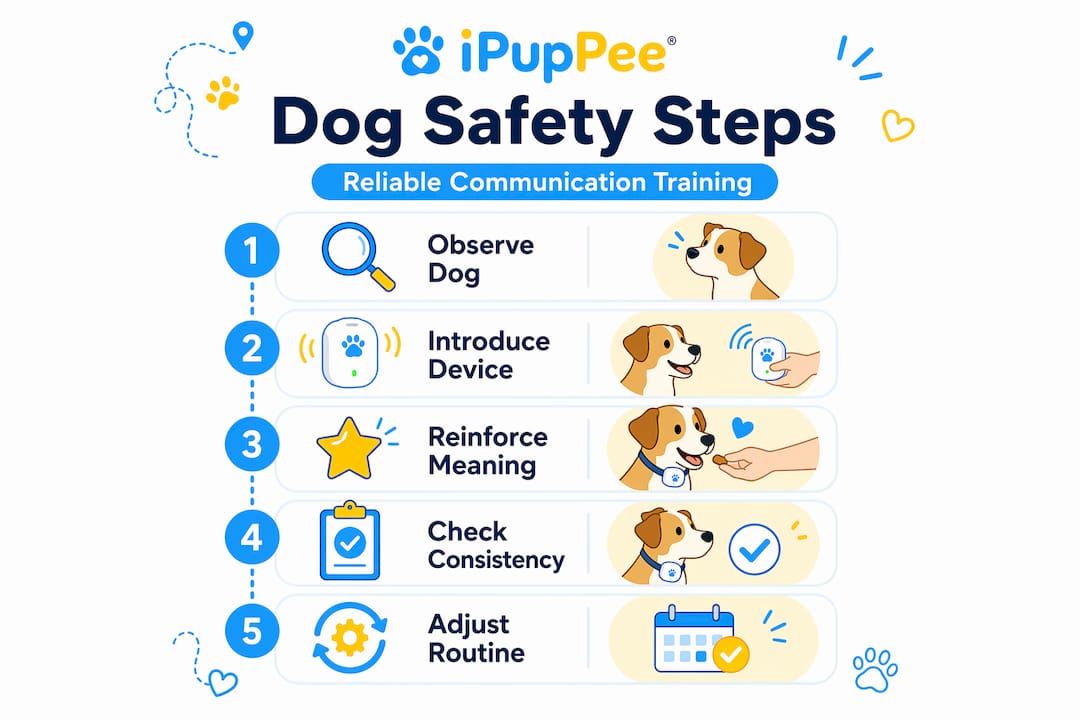
Training in a controlled setup and trusting a device in real life are two very different things. Before you rely on any communication system for safety purposes, you need to verify it holds up under realistic conditions.
Reliability verification steps:
- Test in three different rooms of your home before considering the behavior generalized.
- Introduce mild distractions like the TV on, another family member present, or outdoor noise filtering in.
- Delay your response by five seconds after the button press to confirm your dog repeats or holds the behavior rather than wandering off.
- Record a reliability rate. If your dog gets it right fewer than 8 out of 10 times across varied settings, the behavior isn’t ready for safety use yet.
- Test the device hardware. Button audio quality matters more than most owners realize.
Research highlights a real concern here. Experimental results show that dogs’ apparent communication ability can drop significantly under poor audio or shifting contexts, which means a button that sounds clear to you might not carry the same meaning to your dog in a new room or with background noise.
Pro Tip: Swap button recording audio every few months. Voices change slightly, and a fresh, clear recording helps maintain strong associations, especially if your dog has been using the same buttons for over a year.
Troubleshoot inconsistency by asking: Is the audio clear? Is the treat reward high enough value? Has your routine changed? Is the dog being reinforced for random pressing by accident? Small adjustments often fix what looks like a big problem. Visit the reliable alert training page for a diagnostic checklist that walks through the most common failure points.
What most guides miss about dog-device communication reliability
Most articles about dog communication devices are written with enthusiasm rather than skepticism, and that’s a problem when safety is on the line.
The science is genuinely exciting. The UC San Diego study analyzed hundreds of thousands of button presses across 152 dogs and found evidence of intentional, non-random communication. That’s a meaningful finding. But a benchmark from a research setting does not automatically translate into a reliable safety tool in your particular home, with your particular dog, and your particular environment.
Here’s the uncomfortable truth: your dog’s button behavior at 8 a.m. in a quiet room during a training session may look completely different at 11 p.m. when you’re asleep, there’s a storm outside, and the buttons are in a slightly different location than usual. Dogs are sensitive to context in ways we still underestimate.
We believe the right approach is to treat communication device results like early data, not finished products. Test constantly. Track results. Adjust when something stops working. Don’t assume that because your dog used “outside” correctly 20 times, they’ll use it correctly on time 21. Every new environment, every new distraction, every change in routine is a new test.
Communication training that builds independence requires this mindset more than any other type of training, because the consequences of failure aren’t just a missed trick. For service dog handlers, seniors living alone, and disabled individuals, a failed alert or missed signal can directly affect health and safety. Treat device training with that level of seriousness from day one, and your outcomes will be dramatically better than the typical hobbyist approach.
Support your dog’s communication success with expert resources
If you’ve worked through this guide and you’re ready for the next level, having access to the right tools and expert-backed resources makes a measurable difference in training outcomes.
At iPupPee, we specialize in communication devices and training resources designed specifically for pet owners, service dog handlers, seniors, and anyone who relies on their dog for safety and support. From step-by-step training guides to device reviews and community support, every resource on our platform is built around the real communication needs that matter most. If you want to help your dog go from curious button-presser to reliable communicator, explore our guides and find the tools that fit your situation perfectly.
Frequently asked questions
How long does it take to train a dog to use communication buttons?
Many dogs learn single buttons in 2 to 6 weeks, but reliable two-word combinations can take several months of consistent daily practice.
Are communication devices safe for all breeds and ages?
Button-based devices work well for most dogs of any age, but remote collars require careful fitting and are not appropriate for puppies. Proper fit and the lowest effective stimulation level are mandatory for safe collar use.
How can I tell my dog understands what the button means?
Look for consistency, context-appropriate timing, and repeated use across different situations. Research confirms that intentional sequences are distinguishable from random presses when a dog genuinely understands the association.
What if my dog only uses buttons randomly?
Scale back to a single button, stop rewarding random presses, and rebuild the association through consistent modeling before adding more buttons or complexity.
Is it better to use a remote collar or a soundboard button for safety?
It depends on your dog’s role and your specific need. For medical alerts, a trained physical signal is most reliable. Service dog alert training works best when the signal matches the dog’s natural behavior and is reinforced across real-world contexts, not just controlled training sessions.