

Automated feeding means using a timed or app-controlled device that stores dry food and dispenses measured portions on a set schedule. The main draw is consistency: your dog or cat eats at the same time every day, in the same amount, whether you’re stuck in traffic or out of town for a weekend. It’s a genuine convenience tool, but it doesn’t replace watching your pet eat, checking on their health, or spending time with them.
TL;DR:
- Most automatic feeders are suited for dry kibble, with wet food and fresh diets risking clogging or spoilage.
- Mechanical issues such as jams from irregular kibble shape or a power outage can leave pets unfed until corrected.
- Proper training includes introducing the feeder off and weighing dispensed portions to ensure accurate feeding.
- Features like battery backup, anti-jam mechanisms, and app notifications improve reliability and control.
- Automated feeders support routine but should be paired with ongoing pet observation to monitor health and behavior.
Table of Contents
- What Is Automated Feeding and How Do the Different Types Work?
- Benefits and Real Risks You Need to Plan For
- How to Train Your Dog to Use an Automated Feeder
- Choosing and Setting Up a Feeder That Actually Works for Your Home
- Troubleshooting and Keeping Your Feeder Reliable
- Comparison of Popular Automated Feeder Brands and Models
- How Automated Feeding Affects Your Pet’s Health and Behavior Over Time
- Connecting Feeders to Your Other Smart Home Devices
- What Automated Feeders Cost and Whether They’re Worth It
- Sustainability and Waste Considerations With Automated Feeders
- Andrew’s Take: Automation Handles the Routine, Not the Relationship
- Where to Go for Feeding Routines and Pet Safety Tools
- Sources
What Is Automated Feeding and How Do the Different Types Work?
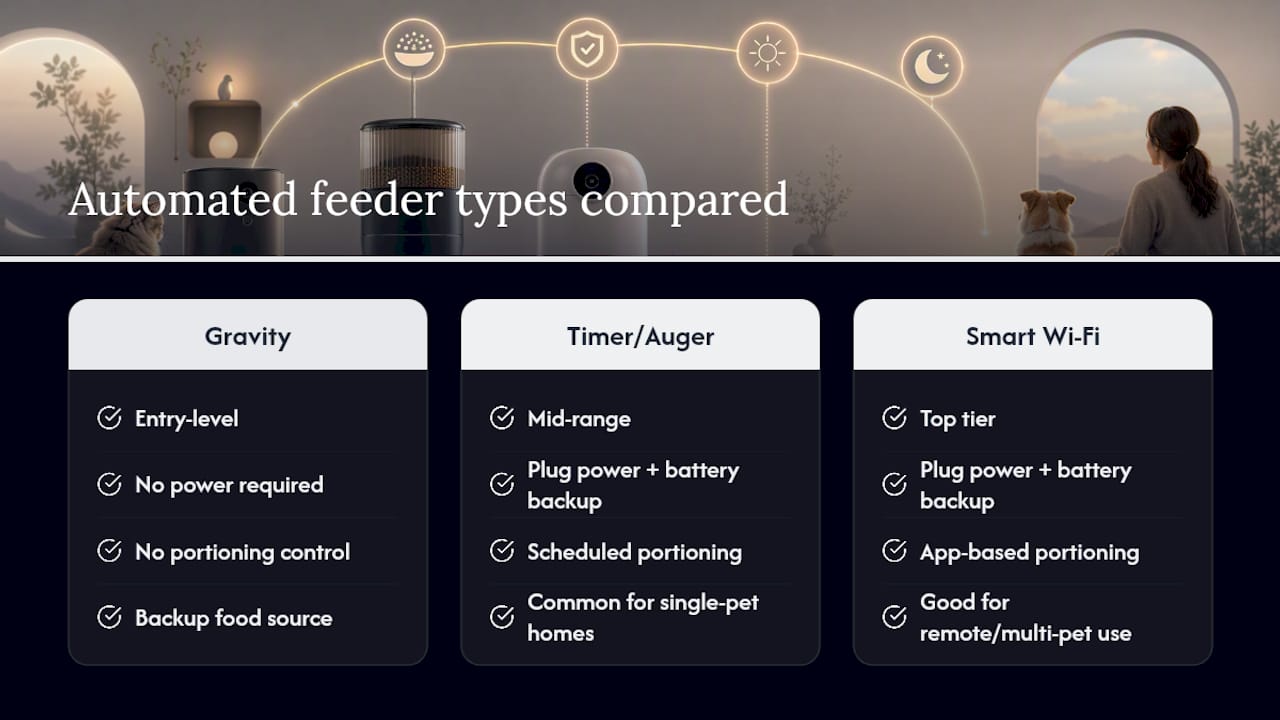
Not every automatic feeder works the same way, and picking the wrong mechanism for your situation is the most common mistake new buyers make. The category breaks down into three basic designs.
Gravity feeders are the simplest: a hopper holds dry kibble and lets it fall into a bowl as the pet eats, refilling by gravity alone. There is no power source needed, which makes them nearly bulletproof against breakdowns, but they can’t control portion size. A food-motivated dog can empty the whole hopper in one sitting.
Timer and auger feeders use a small motor to rotate a portioning wheel or auger at scheduled intervals, dropping a set amount of kibble into the bowl. This is where most portion control lives, and it’s the category that lets you actually manage a dog’s weight or split meals into smaller, more frequent servings.
Smart Wi-Fi feeders add app control, built-in cameras, and push notifications, so you can trigger a feeding remotely, watch your pet eat, and get alerts if something looks off. They’re the most flexible option but also the most dependent on your home network and a charged battery.
A few things to keep in mind:
- Most automatic feeders are built for dry kibble; wet food and fresh diets generally clog the mechanism or spoil sitting out.
- Kibble shape and size affect dispensing accuracy, so round or oddly shaped pieces may jam more than standard pellets.
- Mains-powered models with a battery backup handle outages better than gravity units, which need no electricity at all.
Benefits and Real Risks You Need to Plan For
The upside is straightforward. A feeder that dispenses exact portions on a fixed schedule can reduce overfeeding caused by “scoop creep”, that slow habit of eyeballing a slightly bigger scoop every week. It also keeps a routine intact when your schedule doesn’t cooperate, which matters a lot for pets prone to anxiety around mealtime gaps.
The risks are just as real, and they fall into three categories:
- Missed health cues. A feeder can’t notice that your dog is eating slower than usual or skipping meals, both early signs of illness.
- Mechanical failure. Jams from odd-shaped kibble and power loss during an outage are the two most common breakdowns, and both leave your pet without food until you catch the problem.
- Noise aversion. Some feeders make a loud motor or dispensing sound that can startle noise-sensitive pets, especially the first few times.
One veterinary source notes that owners relying on automatic feeders as part of a weight management plan get the best results when portions are set with actual guidance rather than guesswork, since even minor overdispensing adds up over weeks. Build a simple safety checklist before you trust a feeder unattended: confirm anti-jam design, verify battery backup, check that the housing is chew-proof, and keep monitoring your pet’s appetite the same way you would without the device.
How to Train Your Dog to Use an Automated Feeder
Dogs don’t automatically understand a machine that suddenly makes noise and produces food. Sensitive dogs and service dogs in particular need a slow, deliberate introduction, or the first dispensing cycle can spook them enough that they avoid the feeder entirely.
- Introduce it powered off first. Let your dog sniff and investigate the feeder for a day or two with no food inside and no sound. Reward calm curiosity with treats placed near, not inside, the unit.
- Run a few manual test dispenses while you’re present. Trigger the feeder by hand and reward your dog for approaching afterward. This gets them used to the sound before it happens on a timer.
- Confirm portion size with a kitchen scale. Multiple manual test dispenses, weighed against the exact kibble you use, is the only reliable way to know the feeder is giving the amount you think it is.
- Use a consistent placement and a calm voice cue. A short, pre-recorded phrase in your own voice, played right before dispensing, can ease the transition for anxious dogs and service dogs adjusting to a new signal.
- Watch the first week closely. If your dog hesitates, jumps, or avoids the feeder after dispensing, adjust the placement or timing rather than pushing through it.
Pro Tip: Set the feeder on a low, stable surface away from corners, and add a thin rubber mat underneath. Hard floors and tight corners amplify the motor noise, and that small acoustic change is often enough to turn a nervous dog into a confident one within days.
Choosing and Setting Up a Feeder That Actually Works for Your Home
The right feeder depends less on brand and more on matching features to your household. Before you buy, run through this checklist:
- Portion accuracy: look for a model with a fine-grained portion dial or gram-based app settings, not just “small, medium, large.”
- Schedule flexibility: confirm it supports at least four feeding windows if you have a puppy or a pet on a vet-recommended split-meal plan.
- Anti-jam mechanism: a sensor or manual clear button saves you from a dog going hungry over an odd-shaped piece of kibble.
- Battery backup: essential if you live somewhere with frequent outages or travel often.
- App control and notifications: useful if you want confirmation a meal actually dispensed, especially for smart Wi-Fi models.
Bowl design matters more than people expect. Cats generally do better with wide, shallow bowls that don’t touch their whiskers, while dogs need a bowl heavy or wide enough that an eager eater can’t tip it over mid-meal.
Once the feeder’s installed, run it through a few test feedings before trusting it fully. Weigh the dispensed portion, confirm it matches your target amount, and set up app notifications if the model supports them. Multi-pet homes need an extra decision point: separate feeders spaced well apart, or a single unit with individual pet recognition, so one dog doesn’t just eat the other’s portion.
Troubleshooting and Keeping Your Feeder Reliable
Most feeder problems trace back to three causes: a jam from irregular kibble shapes, a motor struggling with humidity or dust buildup, or a power interruption with no battery backup in place. A quick weekly wipe-down of the hopper and dispensing chute, plus a monthly check of the battery contacts, prevents most of these before they start.
- Clear jams by emptying the hopper and checking for cracked or oversized kibble pieces.
- Test the motor manually every week to catch early signs of strain.
- Replace or recharge backup batteries on a set schedule rather than waiting for a failure.
- If your pet suddenly stops eating or eats noticeably less, treat that as a health question first, not a device question, and check in with your vet.
| Issue | Likely Cause | Quick Fix |
|---|---|---|
| Feeder jams repeatedly | Irregular kibble shape or size | Switch kibble or clear chute manually |
| No dispensing during outage | No battery backup | Add backup battery pack or switch to gravity model |
| Pet avoids the feeder | Startling motor noise | Reposition away from corners, add a soft mat |
| Portions seem inconsistent | Miscalibrated auger setting | Run manual test dispenses and weigh output |
Comparison of Popular Automated Feeder Brands and Models
The market splits fairly cleanly by mechanism type rather than brand loyalty, which is actually helpful when you’re shopping. Basic gravity hoppers sit at the entry level and appeal to owners who just want a backup food source with zero moving parts to fail. Mid-range timer and auger models add scheduled portioning and usually run on both plug power and battery backup, making them the most common choice for single-pet households on a predictable routine.
Smart Wi-Fi feeders occupy the top tier, and the differences between models usually come down to camera quality, app reliability, and how well the notification system catches jams or empty hoppers before you notice on your own. Some models add voice-recording features that let you play a short greeting when the feeder dispenses, which is genuinely useful for pets adjusting to a new routine or an owner’s absence. Others focus on multi-pet recognition through microchip or collar-tag sensors, which matters more in multi-pet homes than any camera resolution spec.
Rather than chasing a specific brand name, match the feature set to your actual problem: if jams are your main worry, prioritize anti-jam sensors over camera quality; if you travel often, prioritize battery backup and app alerts over portion granularity. The best feeder for a senior cat eating small, frequent meals looks nothing like the best feeder for a working dog on a strict twice-daily schedule.
How Automated Feeding Affects Your Pet’s Health and Behavior Over Time
Used correctly, automated feeding tends to smooth out a pet’s eating pattern rather than change it dramatically. Dogs and cats on a fixed schedule often show less food-anxiety behavior around mealtime, since they learn food arrives reliably rather than depending on when a person happens to be home. That predictability can measurably help pets who tend toward resource guarding or anxious pacing before meals.
The flip side shows up when a feeder replaces attention rather than supplementing it. A device that dispenses food on schedule says nothing about how much your pet is actually eating from that portion, whether they’re chewing normally, or whether their weight is trending in the wrong direction. Feeders support routine and portion control, but they’re not a substitute for hands-on interaction, and pets whose only human contact is a food dispenser tend to show more behavioral withdrawal over months, not less.
The healthiest pattern combines the device with regular hands-on feeding sessions, ideally at least once a day, so you’re still present for the behavioral cues a feeder can’t catch: reluctance to approach the bowl, slower chewing, or a sudden drop in interest that often signals something worth a vet visit.

Connecting Feeders to Your Other Smart Home Devices
Smart feeders increasingly plug into the same ecosystem as your other connected devices, and that integration is where the real convenience shows up. Many app-based feeders support voice assistant commands, letting you trigger a manual feeding or check the last dispensing time without opening a separate app. Some pair with smart cameras or existing home security systems, so a single notification feed covers both your front door and your pet’s last meal.
For service-dog handlers and caregivers managing multiple responsibilities, this kind of integration reduces the number of separate systems you have to check throughout the day. A feeder that logs into the same notification hub as a pet alert device, for instance, means one glance at your phone tells you whether your dog has been fed and whether they’ve signaled for anything else. That layered approach, rather than any single gadget, is what actually builds a safer daily routine for pets who rely on consistent care.
What Automated Feeders Cost and Whether They’re Worth It
Entry-level gravity feeders sit at the low end of the price range and, since they have no motor or electronics, rarely need replacement parts. Timer and auger models cost more upfront but earn that back over time by preventing the kind of portion drift that leads to overfeeding and, eventually, higher vet bills tied to weight management.
Smart Wi-Fi feeders sit at the top of the price range, and the extra cost buys you the camera, app infrastructure, and remote notifications rather than any meaningful gain in mechanical reliability. Whether that’s worth it depends entirely on your situation: a service-dog handler who needs remote confirmation that a meal dispensed gets real value from that premium. A single-pet household with someone home most days may find a basic auger model does the same job for less money.
The long-term value case is strongest for anyone managing a strict feeding schedule for medical reasons, multiple pets with different portion needs, or long work hours away from home. For casual use, the investment matters less than picking a reliable mechanism you’ll actually maintain.
Sustainability and Waste Considerations With Automated Feeders
Automated feeders can cut down on food waste in a fairly direct way: precise portioning means less kibble left sitting in a bowl going stale, and less food thrown out because a hand-scooped portion was too generous. Over months, that adds up to a measurable reduction in wasted dry food compared to free-feeding or eyeballed portions.
The tradeoff sits on the hardware side. Most feeders run on plastic housings and motorized components that eventually wear out, and battery-powered models add another layer of electronic waste when they reach the end of their life. Choosing a model built with replaceable parts, rather than a fully sealed unit, extends its usable life and keeps it out of a landfill a few years sooner. Buying a feeder sized correctly for your pet’s needs from the start, rather than upgrading repeatedly as needs change, also reduces the overall footprint of owning one.
Andrew’s Take: Automation Handles the Routine, Not the Relationship
The gap I keep seeing between what automated feeders promise and what they actually deliver comes down to one thing: owners treat the test-feed step as optional. It isn’t. Running a few manual dispenses and weighing the output before you trust a feeder unattended is the single habit that separates a smooth transition from a stressful one, especially for service-dog handlers who can’t afford a missed or mis-portioned meal.
Automated feeding is a scheduling tool. It is not a monitoring system, and it’s not a substitute for noticing that your dog ate slower today or that your cat walked away from a full bowl. Pair the device with the same attentiveness you’d bring to hand-feeding, and read up on pet alert systems if you want a second layer of safety beyond the feeder itself, particularly for pets who live alone with a caregiver for long stretches of the day.
— Andrew
Where to Go for Feeding Routines and Pet Safety Tools
Automated feeders solve the food half of the equation. They say nothing about whether your dog can reach you in an emergency, alert you to distress, or communicate a need outside mealtime. That’s the gap smart alert devices are designed to close, giving dogs a way to send a direct notification, sometimes with live video and two-way audio, to their owner or an emergency contact with a simple button press.
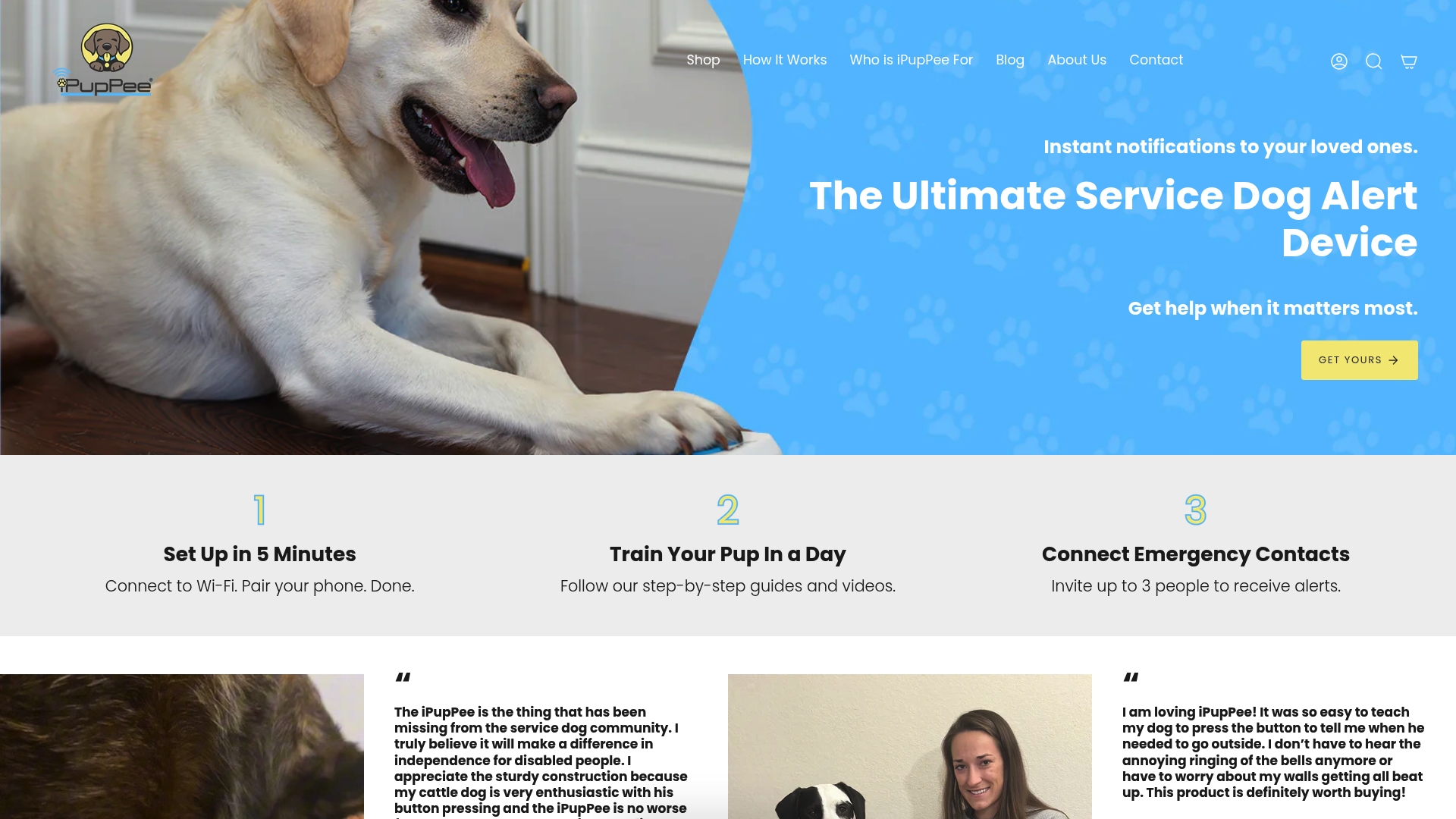
If you’re building a full routine around an automated feeder, pair it with a slow-feed bowl like the Mr. Peanut’s Silicone Slow Feeder for fast eaters, and read through Ipuppee’s guide on establishing a feeding routine your dog can rely on to line up feeding times with training and communication cues. For service-dog handlers, seniors, and anyone caring for a pet with special needs, Ipuppee to see how the alert device and training course work alongside a feeding schedule, not instead of one.
Sources
- Pros and cons of automatic feeders | VCA Hospitals
- Pros and cons of automatic feeders | Food52
- How automatic pet feeders work | AutoPetFeed