

TL;DR:
- A dog alert interface is a purpose-built device that enables trained dogs to communicate alerts to humans using physical inputs tailored to canine abilities. These systems include various types such as push buttons, biteable tugs, and AI-enabled wearables that monitor health and environment without requiring trained behavior. Combining canine-centered design, proper training, and emerging AI technology enhances reliable communication and emergency response for dogs with special needs.
Most people picture a simple buzzer or a basic alarm when they hear “dog alert device.” That picture is wrong, and the gap matters. A dog alert interface is a purpose-built technology designed around how dogs see, think, and move — not a scaled-down version of something made for humans. Whether you are a service dog handler, the owner of a dog with special needs, or someone exploring assistive technology for canines, understanding what is a dog alert interface gives you a real advantage in finding the right solution for your dog and your life.
Table of Contents
- Key takeaways
- What is a dog alert interface, really?
- Wearable and AI-enabled dog alert systems
- Comparing dog alert system types
- Training dogs to use alert interfaces
- What is coming next in canine alert technology
- My take on dog-centered design
- Take your next step with Ipuppee
- FAQ
Key takeaways
| Point | Details |
|---|---|
| Built for canine biology | Dog alert interfaces account for color vision, paw ergonomics, and learning styles specific to dogs. |
| Multiple device types exist | Physical buttons, biteable tugs, and AI-powered wearables each serve distinct alerting purposes. |
| Feedback loops drive reliability | Devices that confirm a dog’s action with tactile or auditory signals produce far more consistent alerts. |
| Training is non-negotiable | No interface works without consistent positive reinforcement and gradual skill-building. |
| AI is expanding the field | Smart collars now monitor vitals and send automated health alerts, going beyond what trained behaviors alone can accomplish. |
What is a dog alert interface, really?
A dog alert interface is a designed device or interaction method that lets trained dogs communicate alerts to humans through physical inputs like buttons, switches, or tugs. That definition sounds simple. The execution is anything but.
The critical distinction between a dog alert interface and an ordinary button is intent and design. Human devices are built for hands: finger pressure, visual text labels, small surface areas. Dog interfaces are built for noses, paws, and mouths. The difference shapes everything from the size and texture of the device to the color of the surface.
Here are the main types of physical inputs you will encounter:
- Push buttons: Large, low-resistance pads activated by a nose or paw press. The Dogosophy Button, for example, features a blue push pad tuned to canine color perception, a grippy texture, and wireless transmission up to 40 meters.
- Biteable tugs: Flexible, bite-safe inputs that dogs activate by pulling. Researchers developing the Canine Alarm Project built a tug input device connected to an electronic module so dogs could trigger emergency calls without human assistance.
- Touch switches: Flat capacitive surfaces that respond to gentle paw contact, often used in more controlled training environments.
- Modular resistance options: Some devices allow handlers to adjust pull or press tension to match individual dog size and jaw or paw strength.
Design also has to account for something rarely discussed: the dog’s ability to remember the behavior under stress. A device that is easy to learn during calm training can fail during a real emergency if the activation method is awkward or inconsistent.
Pro Tip: When evaluating any physical dog alert interface, test it at the height and angle your dog naturally approaches. An interface placed even two inches too high can change how a dog presses it and reduce reliability over time.
Animal-Computer Interaction (ACI) researchers stress that canine-centered design means involving dogs and handlers in iterative prototyping rather than simply adapting existing human tools. The dog’s experience of the device is the design brief.
Wearable and AI-enabled dog alert systems
Physical interfaces require trained behavior. A dog has to learn to press a button. Wearable dog alert systems take a different approach: they generate alerts automatically by monitoring the dog’s physiology and environment.
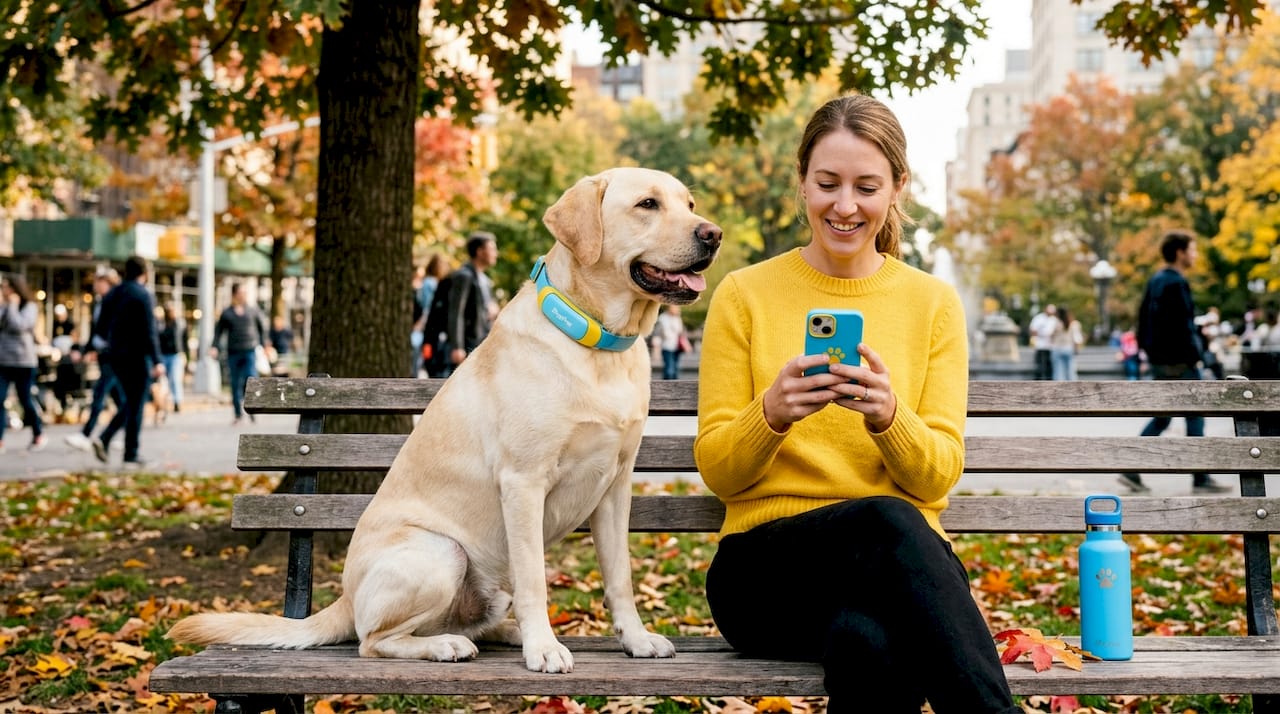
Smart collars are the leading example. Devices like the PetPace collar offer AI-driven health monitoring that tracks temperature, pulse, and respiration and sends near real-time alerts to owners and veterinarians when values fall outside normal ranges. No trained behavior required. The dog simply wears the collar.
What makes these wearable systems genuinely useful as canine alert interfaces:
- GPS tracking: Locates the dog in real time, useful for dogs who may wander due to cognitive changes or seizure events.
- Activity and rest logging: Detects unusual passivity or hyperactivity that can signal pain, anxiety, or illness.
- Vital sign alerts: Notifies owners or vets the moment readings indicate a health concern, often before visual symptoms appear.
- Telehealth integration: Connects monitoring data directly to veterinary platforms so remote consultations can be based on objective readings rather than owner descriptions alone.
- Seizure and fall detection: Algorithms trained on movement data can flag atypical motion patterns associated with neurological events.
The shift that AI introduces here is significant. Integrating AI with alert devices transforms passive monitoring into proactive care. A handler who is asleep, in a noisy environment, or simply not watching receives an alert the dog could never generate on its own. For dogs with epilepsy, cardiac conditions, or respiratory issues, this automated layer of the dog alert system can be life-saving.
These wearable systems are best understood as a complement to, not a replacement for, trained physical interfaces. They do different jobs. A smart collar tells you something is wrong with your dog. A push button lets your dog tell you something is wrong with you.
Comparing dog alert system types
Understanding the differences between physical interfaces and wearable systems helps you choose the right tool for each situation. They are not interchangeable.
| Feature | Physical interface (button/tug) | Wearable alert system (smart collar) |
|---|---|---|
| Activation method | Dog performs trained behavior | Automatic sensor detection |
| Alert range | Local to remote (via connected receiver) | Remote via app/vet platform |
| Training required | Yes, significant | Minimal (wearing the device) |
| Alert type | Handler needs help or emergency | Dog health anomaly detected |
| Durability | Varies; depends on materials | Generally weather-resistant |
| Feedback for dog | Tactile or auditory confirmation | None; dog is passive |
| Best use case | Service dog tasks, emergency calls | Health monitoring, chronic conditions |
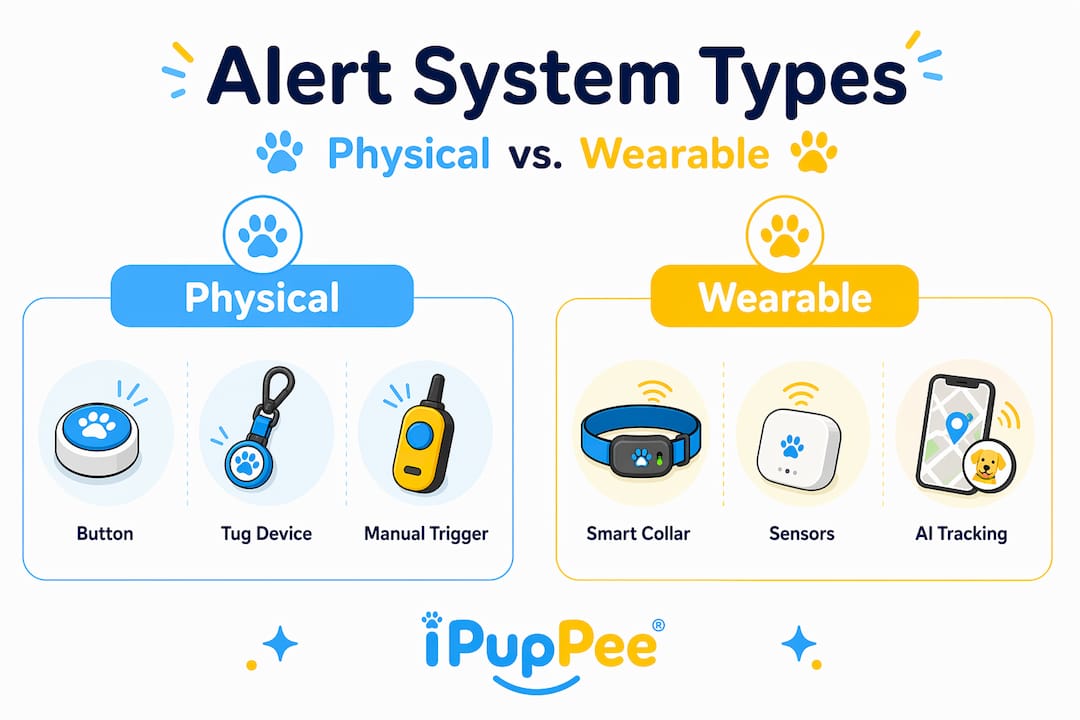
The failure modes in alerting systems define which design you actually need. If the risk is that a handler becomes incapacitated and cannot call for help themselves, a dog-activated physical interface makes sense. If the risk is that a dog’s health deteriorates without visible symptoms, a wearable with AI monitoring covers the gap. Many experienced handlers use both.
A few additional considerations worth weighing:
Dog personality matters. Bold, biddable dogs tend to take to push buttons quickly. Softer or more anxious dogs may need more gradual shaping and a tug interface that requires less precise aim.
Environment shapes the choice. Outdoor working dogs or those in wet environments need waterproof hardware. Indoor dogs with stable routines can use more sensitive capacitive inputs.
Pro Tip: Before purchasing any dog alert system, ask whether the device provides closed-loop feedback. A button that confirms a successful press with a click or vibration reduces random activations and keeps your dog engaged in the task rather than confused about whether the action worked.
Training dogs to use alert interfaces
A well-designed device paired with inconsistent training is still a failed system. This is where many handlers hit a wall: the technology is capable, but the dog is not reliably using it.
Here is how to build reliable alert behavior step by step:
- Introduce the device without expectation. Let your dog sniff, paw, and explore the button or tug freely for several sessions. No cues, no pressure. This builds familiarity and removes novelty anxiety.
- Capture or shape the target behavior. Mark and reward any contact with the device initially, then progressively reward only the specific input (nose press, paw press, tug) that activates it.
- Add the functional outcome. Once the dog reliably activates the device, begin connecting the action to its real consequence: a light turning on, a receiver chiming, a call initiating.
- Practice under mild distraction. Gradually introduce realistic conditions: handler out of sight, low ambient noise, handler appearing unresponsive. The dog must learn that the button matters most when things seem wrong.
- Run regular maintenance sessions. Alert behaviors erode without reinforcement. Short weekly refresher sessions, combined with real-world opportunities to use the device, keep the behavior sharp.
Closed-loop feedback is the technical term for what the dog experiences when the device confirms its action. Tactile resistance on a tug, a click from a push button, a tone from a receiver. This feedback reduces random or accidental activations and helps dogs understand that their behavior produced a result. You can find detailed, step-by-step guidance in this alert button training guide that covers how to build the full behavior chain from first contact to reliable emergency use.
The single biggest training mistake handlers make is rushing to the emergency scenario before the foundation behavior is solid. Build the press first. Build the emergency context second.
What is coming next in canine alert technology
The field is moving faster than most handlers realize. Researchers at Animal-Computer Interaction labs are actively designing the next generation of dog alert interfaces around expanded sensor arrays, not just health vitals but also stress hormones, skin conductance, and gait analysis that can detect emotional states before they escalate.
“Designing from the dog’s point of view is not an abstract principle. It is the research method. We prototype with dogs, iterate with dogs, and validate with dogs. The human benefit is downstream of the canine experience.” — Animal-Computer Interaction Lab, Canine Alarm Project
AI is central to where this goes. Future systems will likely move from threshold-based alerts (“pulse above X”) to behavioral pattern recognition that flags subtle changes weeks before a health crisis becomes acute. For epileptic detection dogs, this could mean an interface that combines the dog’s trained nose-touch alert with a wearable that independently confirms seizure onset signals. Two systems, one message, far greater reliability.
Multispecies user-centered design is also gaining traction as a formal discipline. The premise is that technology can be designed for two species at once without compromising the experience of either. For service dog handlers, this is not theoretical. How dogs alert owners through devices is already a topic drawing serious research attention and commercial investment.
My take on dog-centered design
I have spent years watching assistive technology for dogs go from a niche curiosity to a legitimate field with peer-reviewed research behind it. And the pattern I keep coming back to is this: the handlers who get the best results are the ones who think about the dog’s experience of the device, not just the human’s experience of the alert.
A button that is difficult for a dog to activate reliably is not a communication tool. It is a frustration generator. I have seen handlers abandon perfectly functional hardware because the device was designed for human convenience rather than canine capability. The dog stops engaging, the handler interprets that as stubbornness, and the whole system falls apart.
What I believe future designs must prioritize is honest feedback. Not just tactile confirmation for the dog, but real behavioral data for the handler. Show me how often my dog is pressing the button outside of trained scenarios. Show me if activation rates are declining, because that usually means the behavior is eroding and needs refreshing, not that the dog is “fine.”
The technology that excites me most is the integration of wearable health data with trained alert behaviors. Imagine a system where a seizure-alert dog’s nose touch triggers an emergency call and simultaneously the smart collar confirms the handler’s vitals look consistent with a seizure event. That redundancy is what transforms a good alert system into a trustworthy one. Visit the wearable tech comparison resource if you want a practical look at how these systems are already being combined.
— Andrew
Take your next step with Ipuppee
If this article has moved your thinking from “what is a dog alert interface” to “which one do I need,” Ipuppee is built to help you make that call.
Ipuppee offers educational guides, product comparisons, and training resources specifically for service dog handlers, owners of dogs with special needs, and anyone looking to build a more reliable communication system with their dog. Explore the dog alert systems comparison to see how current devices stack up across range, durability, training demands, and alert type. Or head to ipuppee.com to browse devices designed to put real communication tools in your dog’s paws. You deserve a system that works the first time, every time.
FAQ
What is a dog alert interface used for?
A dog alert interface lets a trained dog communicate specific messages to a human handler by activating a physical device such as a button, tug, or switch. Common uses include calling for emergency help, controlling household appliances, and signaling medical events.
How does a dog alert system differ from a standard alarm?
A dog alert system places the dog as the active communicator rather than a passive subject. The dog triggers the alert through a trained behavior or wearable sensor, whereas a standard alarm is activated by environmental conditions without canine involvement.
What is canine alert training and how long does it take?
Canine alert training teaches a dog to reliably activate a specific interface to communicate a learned response. Timeline varies widely by dog temperament and task complexity, but most handlers see reliable button-press behavior within four to eight weeks of consistent daily practice.
Can any dog learn to use a dog safety interface?
Most dogs can learn basic push-button or tug interfaces given appropriate training and a device suited to their size and sensory profile. Dogs with mobility limitations or severe anxiety may need modified hardware or alternative interface types.
Are wearable dog alert systems accurate enough to rely on?
Wearable systems like AI-powered smart collars have shown strong accuracy for tracking vitals and detecting anomalies, but they work best as a layer alongside trained alert behaviors rather than as a sole alerting method. Redundancy between trained responses and automated monitoring produces the most reliable outcomes.